
mytender vs Microsoft Copilot: Specialist Bid Tool or General Assistant?
You may already have Copilot. So why look at a bid tool too? A comparison of a general AI assistant and a specialist bid tool across the tender lifecycle, based on public information as of October 2026.
Evie
mytender.io

 Microsoft Copilot
"One is a general assistant. One is built for tenders."
Based on public information as of October 2026.
Many organisations already use Microsoft 365. According to Microsoft's website as of October 2026, Copilot Chat is available at no additional cost with an eligible Microsoft 365 subscription, and Microsoft 365 Copilot is a paid add on plan. So if you already have Copilot, why look at another tool for bids?
Comparing specialist tools as well? See mytender.io vs Loopio, mytender.io vs Bidwell and our guide to the best AI bid writing software.
It is a fair question. We are mytender, so we have a stake in the answer. Everything we say about Copilot on this page comes from Microsoft's own website as of 16 October 2026, and we link to the pages we used.
The short version: Microsoft describes Copilot as an AI assistant built into Word, Excel, PowerPoint, Outlook and Teams, for everyday work across many tasks. mytender is built specifically for bids and tenders. They are designed for different jobs, and many teams use both.
General assistant and specialist tool
What mytender adds for bid teams
mytender is built around the stages of a tender, from searching live portals and making a bid or no bid decision, through completing the PQQ and drafting method statements, to scoring answers against the marking scheme, gap analysis, version control and deadline tracking.
1. Structured process
mytender walks the tender lifecycle: find the opportunity, complete the PQQ, draft the method statement, score it against the marking scheme and track the deadline. A tender has mandatory sections, compliance gates and evaluation criteria, and mytender is built around them.
2. Team collaboration
Bids are rarely a solo effort. A bid manager, a technical lead, a case study contributor and a reviewer might all work on the same submission. mytender provides a shared content library, defined roles, version control and a single bid workspace.
Microsoft also offers collaboration features: according to its website, Copilot Pages turn AI responses into editable, shareable content that a team can work on together. If you use Copilot for bids, decide how you will track sections, reviewers and versions for each tender.
3. Bid intelligence
mytender scores your answers against the tender's evaluation criteria, flags weaker areas and draws on your library of past responses. If you use a general assistant instead, plan how you will check each answer against the buyer's published scoring criteria.
What each offers, according to its publisher
| Area | mytender | Microsoft Copilot (according to Microsoft, October 2026) |
|---|---|---|
| Purpose | Designed for tenders, PQQs and method statements | AI assistant built into Word, Excel, PowerPoint, Outlook and Teams |
| Opportunity discovery | Built in tender browser, daily UK portal updates | Not covered on the Microsoft pages we checked |
| Scoring against evaluation criteria | AI scoring against the tender's marking scheme | Not covered on the Microsoft pages we checked |
| Using your own content | Reuse of your past answers from a bid library | With the Microsoft 365 Copilot add on licence, responses can be grounded in your organisation's emails, files and meetings through Microsoft Graph |
| Team collaboration | Shared bid workspace, roles, version control | Copilot Pages for editable, shareable content |
| Custom agents | Not applicable | Agents such as Researcher and Analyst, and Copilot Studio for building your own |
| Licensing | Pricing on request | Copilot Chat at no additional cost with eligible Microsoft 365 subscriptions; Microsoft 365 Copilot as a paid add on |
Is the data safe?
Ask the same questions of any AI tool you use for bids: where data is hosted, who can access it and whether it is used to train models.
According to Microsoft's website as of October 2026, with enterprise data protection in Copilot, prompts and responses stay within the Microsoft 365 service boundary and Microsoft's data handling commitments apply. mytender holds ISO 27001 and Cyber Essentials Plus certification; see our trust centre for details.
Once security is covered, the more useful question is which tool helps your team produce stronger, compliant answers to the tenders you bid for.
Speed and win rate
Saving drafting time is useful, but the commercial return from bid software usually comes from win rate. As an illustration, if a team that wins one bid in five starts winning one in four, that is 25% more contracts won from the same pipeline. On a £200k contract, one extra win a year can cover the cost of a tool many times over. Measure your own results before and after, whichever tools you use.
Which tool for which job?
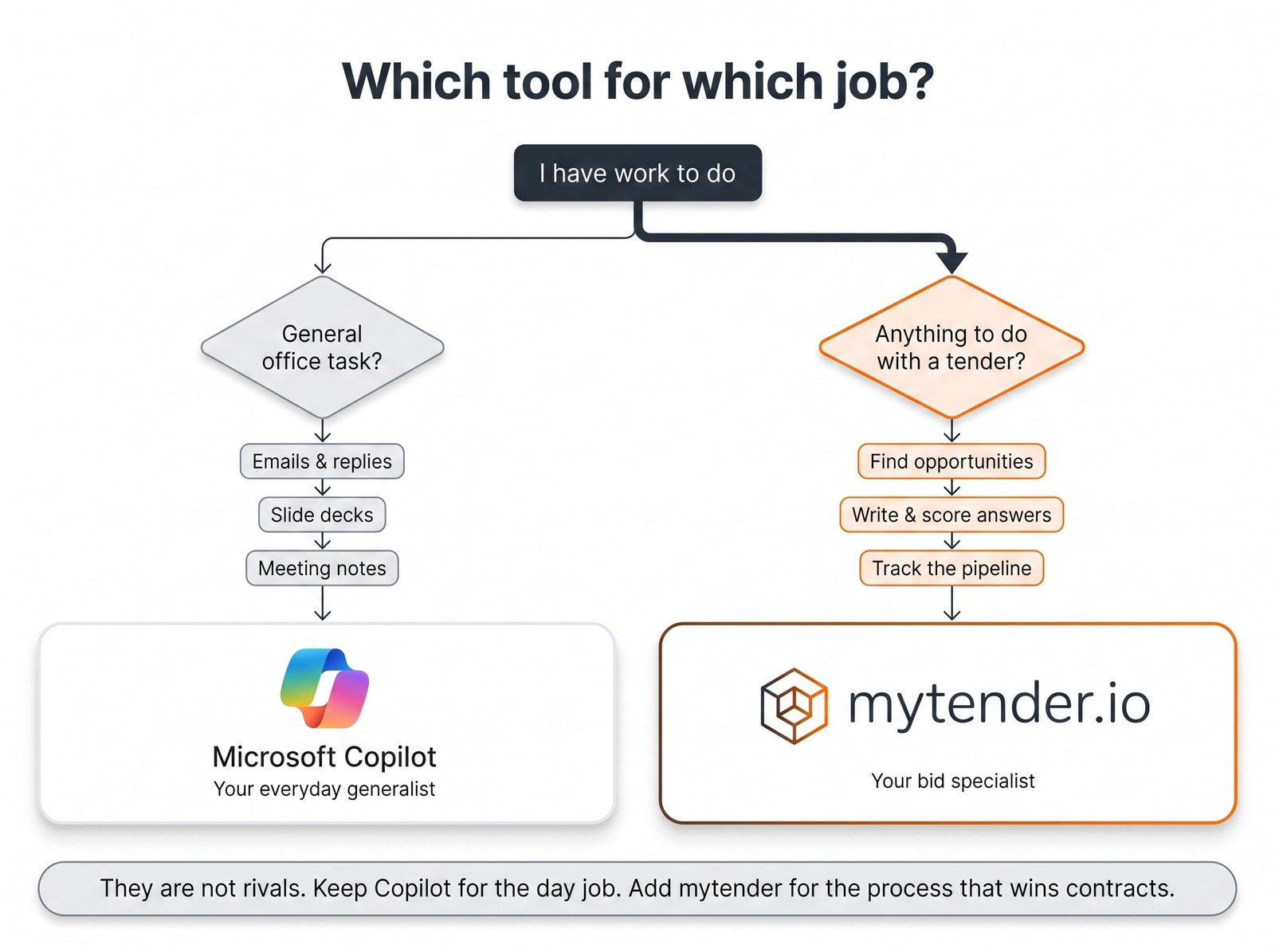
Which tool for which job? A decision flow
They are not rivals. Keep Copilot for the day job. Add mytender for the tender process.
The summary
- Copilot is a general purpose assistant. Microsoft describes it as working across Word, Excel, PowerPoint, Outlook and Teams.
- mytender is built for tenders. Discovery, PQQs, method statements, scoring against the marking scheme and pipeline tracking in one place.
- Ask both about data. Check hosting, access and model training for every AI tool you use with tender documents.
- Measure win rate, not just typing speed. Track bids submitted, quality scores and wins before and after.
If you want to see mytender against a real tender, that is the fastest way to decide. Bring your toughest PQQ and see how it handles it end to end.
If you would rather start smaller, the Tender Finder is free to use and shows live opportunities matched to your sector.
---
About this comparison: information about Microsoft Copilot is based on Microsoft's own public website as of 16 October 2026 (Copilot for business, Microsoft 365 Copilot overview) and may have changed since. Microsoft and Copilot are trademarks of Microsoft Corporation, and this page is not endorsed by Microsoft. If you believe anything here is inaccurate or out of date, please email info@mytender.io or contact us and we will review and correct it promptly.Tags
Ready to Transform Your Tender Writing?
See how MyTender's AI can help you write winning tenders in a fraction of the time.