
UK Tender Portals 2026: Find a Tender and Contracts Finder
A comprehensive guide to every major UK government tender portal — Find a Tender Service, Contracts Finder, Crown Commercial Service, and sector-specific platforms. Learn how to search, set alerts, and never miss an opportunity again.
Evie
Procurement Specialist
Finding government contracts shouldn't be a full-time job. But for many suppliers — particularly small and medium-sized businesses — navigating the labyrinth of UK procurement portals feels exactly like that. Contracts are scattered across national portals, sector-specific platforms, local authority systems, and frameworks that each operate slightly differently, with different registration requirements, different search tools, and different notification systems.
Found a tender worth bidding for? Our invitation to tender guide explains how to read the ITT pack and plan your response.
This guide cuts through the noise. It maps every significant portal you need to know about, explains exactly how each one works, tells you what you'll find there, and gives you practical steps to set up the kind of alert system that means you'll never miss a relevant opportunity again.
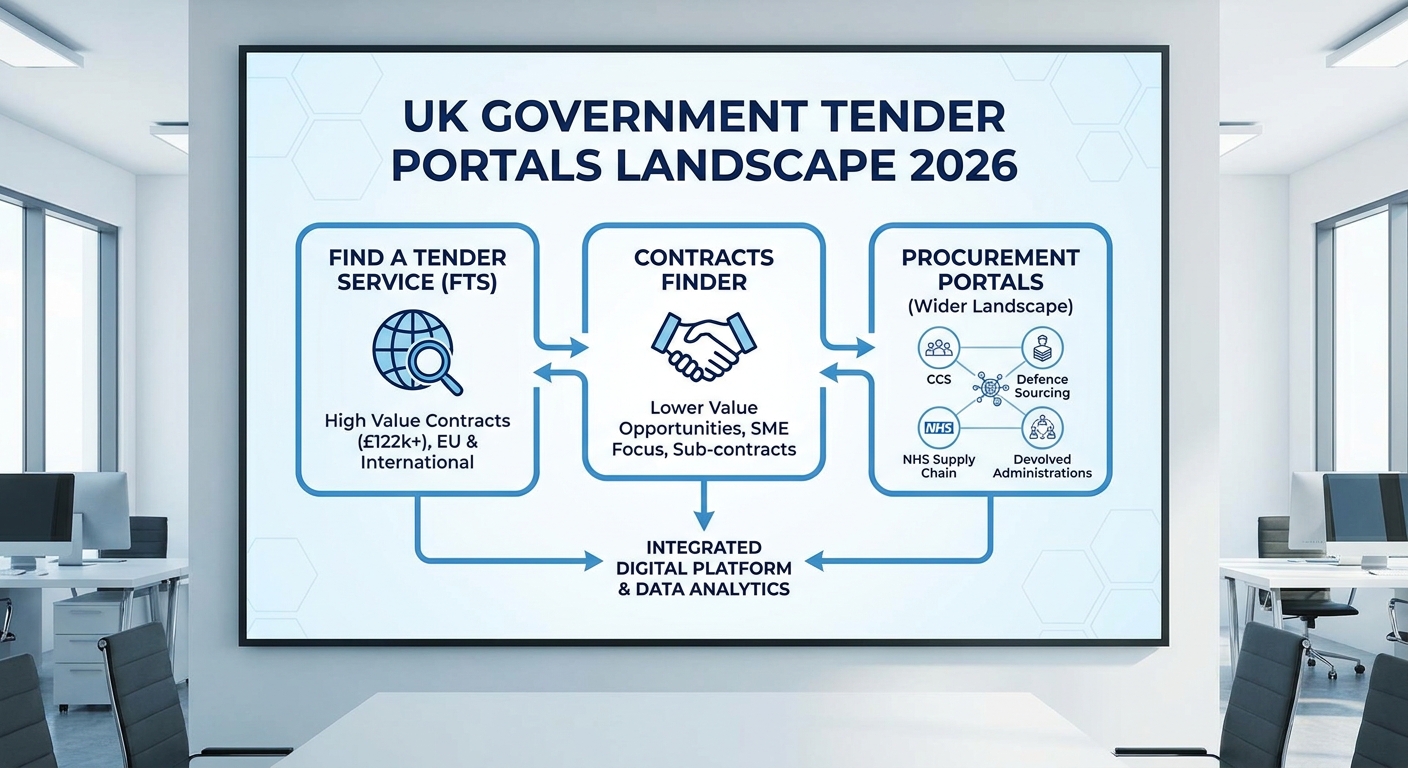
UK government tender portals landscape showing the major procurement platforms and how they connect in 2026
Why Tender Portal Strategy Matters More Than Ever in 2026
The Procurement Act 2023, which came into full effect in February 2025, didn't just change how contracts are awarded — it changed where and how they're advertised. The shift from the old Find a Tender Service (FTS) to a modernised Central Digital Platform (CDP) has been gradual rather than overnight, and many buyers are still transitioning. The result is a period where opportunities are genuinely split across multiple systems.
At the same time, the new Act introduced tighter transparency requirements. Contracting authorities must publish more information earlier — pipeline notices, tender notices, award notices, and contract amendments all have to go somewhere. Understanding where "somewhere" is for your target buyers is the single most important thing you can do to improve your pipeline.
If you're relying on a single portal and manual searches, you are leaving money on the table. The suppliers consistently winning government contracts in 2026 have systematic, largely automated approaches to opportunity identification. They're reviewing their pipeline weekly, not scrambling when a deadline appears.
Let's start with the portals themselves.
---
The National Portals: Where Public Sector Contracts Must Be Published
Find a Tender Service (FTS) / Central Digital Platform
URL: https://www.find-tender.service.gov.uk What it covers: All UK public sector contracts above the relevant threshold values Who publishes here: Central government, NHS, local authorities, utilities, and other regulated entitiesFind a Tender Service is the statutory portal — the place where UK contracting authorities are legally required to publish contract notices for above-threshold opportunities. Under the Procurement Act 2023, the underlying infrastructure is being migrated to the Central Digital Platform (CDP), but FTS remains the public-facing search interface.
The thresholds that trigger mandatory publication on FTS (from 1 January 2026) are:
| Contract Type | Threshold |
|---|---|
| Central government goods and services | £139,688 |
| Sub-central authorities (local councils, NHS, etc.) goods and services | £214,904 |
| Works contracts (all authorities) | £5,372,609 |
| Light-touch regime (social, health, education services) | £663,540 |
The FTS search interface allows filtering by CPV (Common Procurement Vocabulary) code, contracting authority, contract type, publication date, and value. Most experienced bid teams use CPV codes rather than keyword searches — the controlled vocabulary means you catch everything relevant rather than relying on buyers using your preferred terminology.
Key CPV codes to know for common sectors:
- Facilities management: 79993000-1
- IT services: 72000000-5 to 72920000-4
- Construction: 45000000-7 (parent code, with many sub-codes)
- Healthcare services: 85000000-9
- Cleaning services: 90910000-9
- Security services: 79710000-4
- Waste management: 90510000-5
Set up an account and save your searches. FTS allows email alerts for new notices matching your saved searches — this should be running continuously, not something you check manually.
What you'll see on a typical notice:Each notice includes the contracting authority, contract title, a description of requirements, the estimated value, the deadline for expressions of interest or tender submission, and — increasingly under the new Act — links to procurement documentation on the buyer's chosen eTendering platform. FTS itself is primarily a notice board; the actual tender documents are usually hosted elsewhere.
Contracts Finder
URL: https://www.contractsfinder.service.gov.uk What it covers: UK public sector contracts, including those below the FTS thresholds Who publishes here: All UK public sector bodies (mandatory for contracts above £10,000 for central government; recommended for others)Contracts Finder is often overlooked by suppliers who fixate on FTS. This is a significant mistake. For SMEs in particular, the sweet spot for public sector work is often in the £50,000–£200,000 range — below the FTS thresholds but above what most buyers handle without any formal process.
Central government departments must publish on Contracts Finder for any contract above £10,000. While local authorities and NHS bodies aren't legally required to publish below the FTS thresholds, many do — either voluntarily or under their own standing orders. If your target buyers include local councils, NHS trusts, or housing associations, Contracts Finder deserves regular attention.
Contracts Finder also publishes award notices, which means you can use it for market intelligence — seeing who won what contract, at what value, gives you insight into your competition and into which buyers are actively spending.
Practical tips:- Search by buyer type (central government vs. NHS vs. local authority) to narrow down relevant opportunities
- Use the "awarded contracts" filter to research competitors and understand buyer spending patterns
- Register for email alerts using the "Save search" function — equivalent to FTS alerts but covering the sub-threshold market
- Note that some entries are minimal — buyers sometimes post the bare minimum required. Don't dismiss a notice because the description is sparse; it may be worth a call to the contracting authority for more detail
---
Crown Commercial Service (CCS) and Framework Agreements
URL: https://www.crowncommercial.gov.uk What it covers: Government-wide framework agreements, Dynamic Purchasing Systems, and call-off contracts Who uses it: All central government departments, and many other public bodiesCrown Commercial Service manages the largest centralised buying arrangements in UK public procurement. If you're a supplier of IT services, professional services, fleet, travel, energy, or facilities management to central government, understanding CCS frameworks isn't optional — it's essential.
The key CCS catalogue includes:
Technology products and services: G-Cloud (now on the Digital Marketplace), Technology Services, Network Services, and various cyber and data frameworks. These are route-to-market essentials for any technology supplier targeting government. Professional services: Management consultancy, legal services, audit, temporary staffing. High-value frameworks that gate access to significant contracts. Facilities management: Total Facilities Management frameworks covering large-scale estate management contracts for government departments. Fleet and travel: Less relevant for most suppliers, but dominant in those niches.Being on a CCS framework doesn't guarantee you'll win business — it's a prerequisite, not a contract. But being off a relevant framework when your target buyers use it exclusively means you simply cannot be considered.
How to get on a CCS framework:CCS runs periodic refresh exercises for its frameworks. Suppliers submit applications during an "open window" — a defined period where new suppliers can apply to join an existing framework. The Digital Marketplace (for G-Cloud and DOS-successor frameworks) runs continuous opens, meaning you can apply at any time.
Watch the CCS pipeline at https://www.crowncommercial.gov.uk/agreements/upcoming-procurement-activity — this lists upcoming framework renewals and new frameworks in development, giving you advance notice to prepare applications.
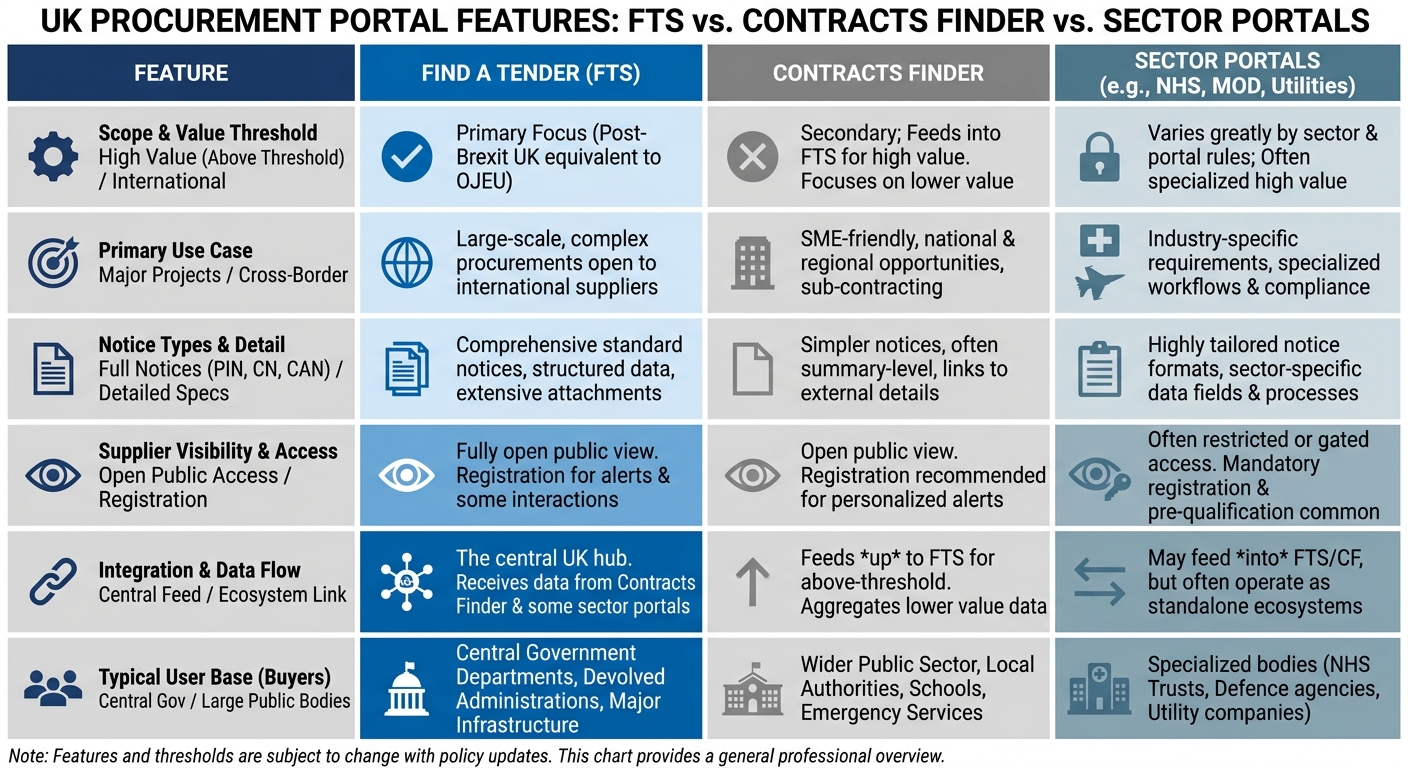
Comparison of UK procurement portals showing features, thresholds and best use cases for each major platform
---
Sector-Specific Portals You Need to Know
Beyond the national portals, the UK has a rich ecosystem of sector-specific platforms. Ignoring these is one of the most common mistakes suppliers make. Many significant contracts never appear on FTS or Contracts Finder because they're below threshold, because the buyer uses a sector platform exclusively, or because they're call-offs from frameworks not individually advertised.
NHS and Healthcare: NHS Supply Chain and Atamis
NHS Supply Chain (https://www.supplychain.nhs.england.nhs.uk) manages procurement for NHS trusts across England. It operates category management programmes covering everything from medical consumables and capital equipment to facilities services. Suppliers seeking to sell to NHS organisations need to understand the Supply Chain's framework structure. Atamis is the eTendering platform used by many NHS trusts and Integrated Care Boards for their own direct procurement. If you're targeting NHS buyers, you'll encounter Atamis frequently — register in advance rather than scrambling during a live procurement. NHS Shared Business Services (NHS SBS) manages procurement frameworks for NHS organisations and publishes opportunities through its own portal. Check https://www.sbs.nhs.uk/proc-procurement-tendering for active frameworks.Local Government: ProContract, Jaggaer, and the Tenders Electronic Daily Equivalents
Local authorities have historically used a fragmented mix of eTendering systems. The most common platforms you'll encounter include:
ProContract / Delta eSourcing (https://www.delta-esourcing.com): One of the most widely used local authority eTendering platforms. Many councils publish all their tender opportunities here, regardless of value. Free registration; strongly recommended for suppliers targeting local government. Jaggaer (formerly BravoSolution): Used by a significant number of councils and combined authorities. Another essential registration for local government suppliers. Due North / In-Tend: Common in the North of England and Scotland. Proactis: Used by several metropolitan councils and healthcare organisations. The practical answer: You cannot register on all of them upfront. Instead, identify the specific councils and NHS bodies that represent your primary target market and check which platforms they use. Most contracting authority websites have a procurement section that will tell you. Register on those platforms before the first opportunity you want to pursue — not on deadline day.Scotland: Public Contracts Scotland
URL: https://www.publiccontractsscotland.gov.uk Coverage: All Scottish public sector contracting authoritiesScotland operates its own dedicated portal, separate from the England/Wales FTS equivalent. If any part of your target market includes Scottish public sector organisations — whether NHS Scotland, Scottish councils, Scottish Government, or other public bodies — you need a separate registration on Public Contracts Scotland.
PCS also publishes sub-threshold opportunities at lower values than FTS requires, making it valuable for SMEs targeting Scottish buyers even below national thresholds.
Wales: Sell2Wales
URL: https://www.sell2wales.gov.wales Coverage: Welsh public sector contracting authoritiesSell2Wales is the primary procurement portal for Welsh public bodies, including Welsh Government, NHS Wales, and Welsh local authorities. Similar to Public Contracts Scotland, it publishes opportunities at lower thresholds and includes additional support resources specifically for Welsh SMEs.
If Wales is part of your market, registration here is non-negotiable.
Northern Ireland: eSourcing NI and Constructionline
eSourcing NI (https://e-sourcingni.bravosolution.co.uk): Northern Ireland's public sector eTendering platform, used by the NI Executive, health and social care trusts, councils, and other public bodies. Constructionline (https://www.constructionline.co.uk): Not a tender portal but a pre-qualification platform widely used in construction and facilities management. Many public sector buyers require Constructionline membership as a condition of tendering for works contracts. It's worth maintaining an active membership if construction or FM is your market.The Digital Marketplace: G-Cloud and the Digital Outcomes Successor
URL: https://www.digitalmarketplace.service.gov.uk Coverage: IT, cloud, software, and digital specialist services for public sectorThe Digital Marketplace is CCS's online storefront for technology suppliers. G-Cloud allows buyers to procure cloud-hosted software, infrastructure, and support directly without running a full tender — buyers search the catalogue and award directly to listed suppliers. For SaaS providers and cloud infrastructure companies, G-Cloud is often the fastest route into government.
The Digital Outcomes framework (now evolved into newer iterations) covers bespoke digital projects — custom development, data science, user research, design. If you deliver digital services rather than products, this is your primary framework.
Applications are open continuously for G-Cloud. Prepare your service descriptions carefully — they function like SEO-optimised product listings, and buyers search them to find suppliers. Weak, generic descriptions mean you won't surface in buyer searches.
---
Setting Up a Systematic Alert System
Most suppliers approach portal monitoring reactively — they check when they remember, or when someone mentions a contract is out. This approach guarantees missed opportunities. A systematic alert setup takes two hours to build and saves hours every week.
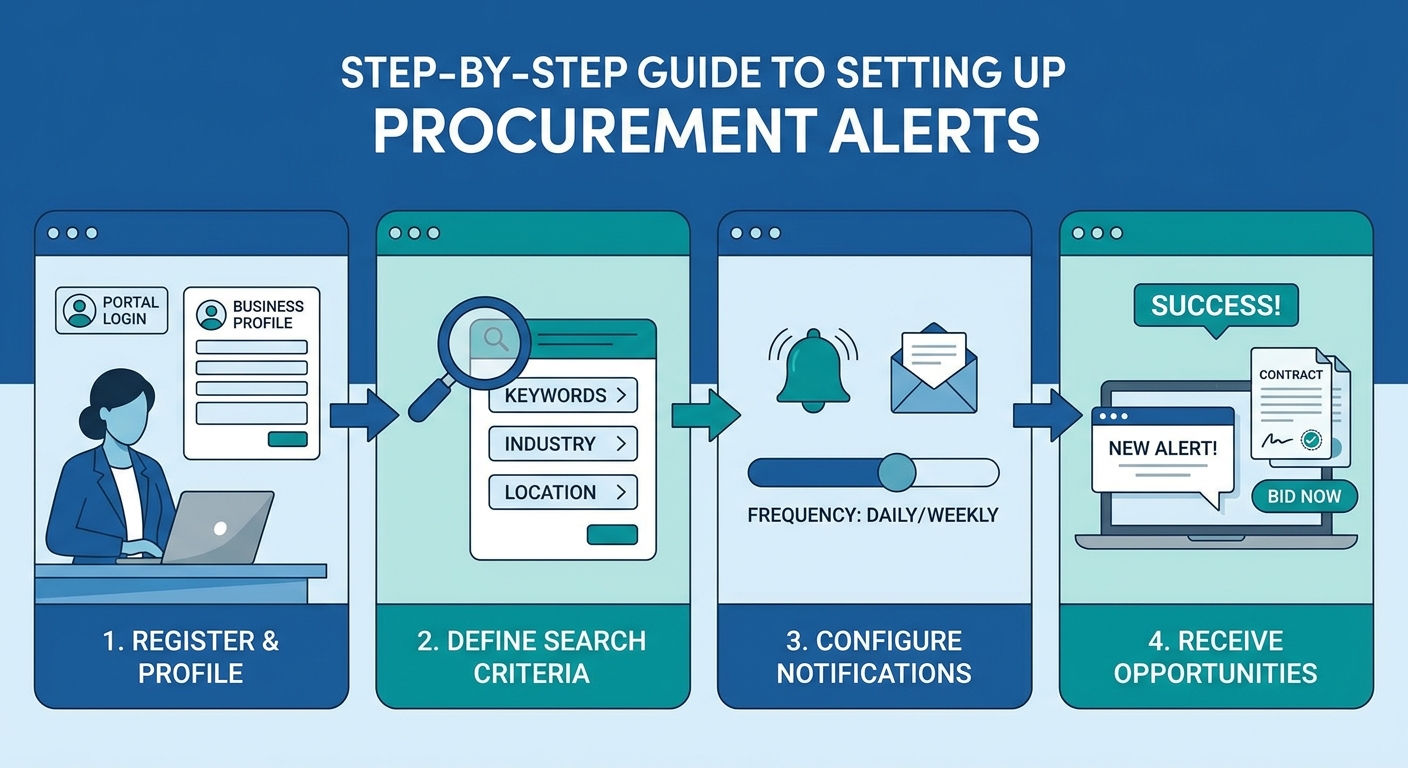
Step-by-step guide to setting up tender portal alerts including keyword strategy and notification configuration
Step 1: Define Your Opportunity Criteria
Before setting alerts, you need clear criteria for what constitutes a relevant opportunity. Vague criteria mean noise; noise means people stop checking alerts. Define:
Contract value range: What's your minimum viable contract size? What's the maximum you could realistically resource? Setting a floor (e.g., £50,000) prevents you drowning in tiny contracts that cost more to bid than they're worth. CPV codes: Identify the 5–10 CPV codes that best describe your services. These are more reliable than keywords because they don't depend on buyers using your terminology. Geographic scope: Can you realistically deliver nationally, or are you focused on specific regions? Most eTendering platforms allow geographic filtering. Buyer type: Central government only? NHS? Local government? Being specific reduces noise significantly. Keywords: Despite CPV codes being more reliable, a keyword layer catches opportunities that buyers miscategorise. Use specific, distinctive terms relevant to your service.Step 2: Configure Platform Alerts
On Find a Tender Service:- Create a free account at https://www.find-tender.service.gov.uk
- Run your preferred search (CPV codes, keywords, filters)
- Save the search using "Save and get alerts"
- Choose daily or immediate notification frequency
For most suppliers, daily digest is sufficient — immediate alerts create inbox noise that leads to alert fatigue.
On Contracts Finder:- Register at https://www.contractsfinder.service.gov.uk
- Build your search criteria
- Use "Save search" to create ongoing alerts
- Set email frequency
- Register and complete your supplier profile
- Set up keyword and category alerts in your account settings
- Configure email notification preferences
Step 3: Build a Weekly Review Process
Alerts alone aren't enough. The discipline is in the weekly review:
- Monday morning: check all alert digests — classify opportunities as pursue / watch / discard
- Build a simple pipeline tracker — a spreadsheet showing opportunity name, portal, publication date, submission deadline, estimated value, go/no-go decision
- Set a calendar reminder for each submission deadline at D-14, D-7, and D-2 from close
- Review the pipeline in team meetings — the bid team should know what's coming 4–8 weeks out, not 48 hours
The goal is never to be surprised by a deadline. Surprise is what forces rushed, low-quality submissions — and rushed submissions lose.
---
Beyond the Portals: Intelligence Sources That Give You an Edge
Portals show you what's live. But the best suppliers are preparing for opportunities before they're advertised. These intelligence sources extend your horizon.
Pipeline Notices Under the Procurement Act 2023
One of the most valuable changes introduced by the Procurement Act is the requirement for contracting authorities to publish "pipeline" notices for their anticipated contracts above £2 million. These go on the CDP (accessible through FTS) and give suppliers advance visibility of what a buyer intends to procure, sometimes 12–18 months ahead.
Regularly reviewing pipeline notices for your target buyers means you can:
- Prepare capability statements and case studies in advance
- Seek pre-market engagement meetings before the formal process opens
- Identify capability gaps you need to fill before you can credibly bid
Pipeline notices don't always appear — and not all buyers are diligent about publishing them — but they're valuable when they do.
Pre-Market Engagement (PME)
The Procurement Act explicitly encourages pre-market engagement. Buyers are now more comfortable than ever with suppliers approaching them before a procurement starts, provided it's done transparently. A meeting with a procurement lead 6–12 months before a contract is due to re-tender isn't unusual — it's how many successful bidders prepare.
Pre-market engagement won't give you insider advantage (any information shared must be available to all bidders), but it gives you:
- A deeper understanding of the buyer's priorities and pain points
- A chance to shape the requirements specification (legitimately, through evidence-based input)
- Relationships that help you interpret ITT documents accurately
- Early warning if the buyer is moving in a direction that doesn't suit your offer
The protocol: be transparent about who you are and why you're engaging. Document the meeting. Focus on sharing knowledge and understanding needs — not pitching.
Contract Award Notices and Expiry Tracking
Every contract awarded above threshold generates an award notice on FTS or Contracts Finder. Award notices tell you:
- Who won the contract
- What they're being paid
- When the contract expires
That last point is gold. If a competitor won a contract that expires in 18 months, you know exactly when the retendering process will likely start. Start your intelligence-gathering and relationship-building now. The supplier who walks into the ITT having already built relationships and understood the buyer's objectives has a structural advantage over one who discovers the opportunity when the portal notification arrives.
Build a simple tracker: contract name, incumbent, expiry date, estimated value, target priority. Review it monthly.
Buyer Websites and Annual Reports
Many public bodies publish their procurement plans on their own websites. NHS trusts, local authorities, and government departments often have procurement sections listing their forward pipeline, preferred supplier lists, and procurement strategy. These are underutilised by most suppliers.
Annual reports and budget documents can also signal where spending is likely to increase. A council that has publicly committed to a major capital programme will need to procure the delivery capacity. A hospital trust announcing a new clinical service will need the facilities management and catering to support it. Connecting the dots between an organisation's strategic direction and its likely procurement needs puts you ahead of the game.
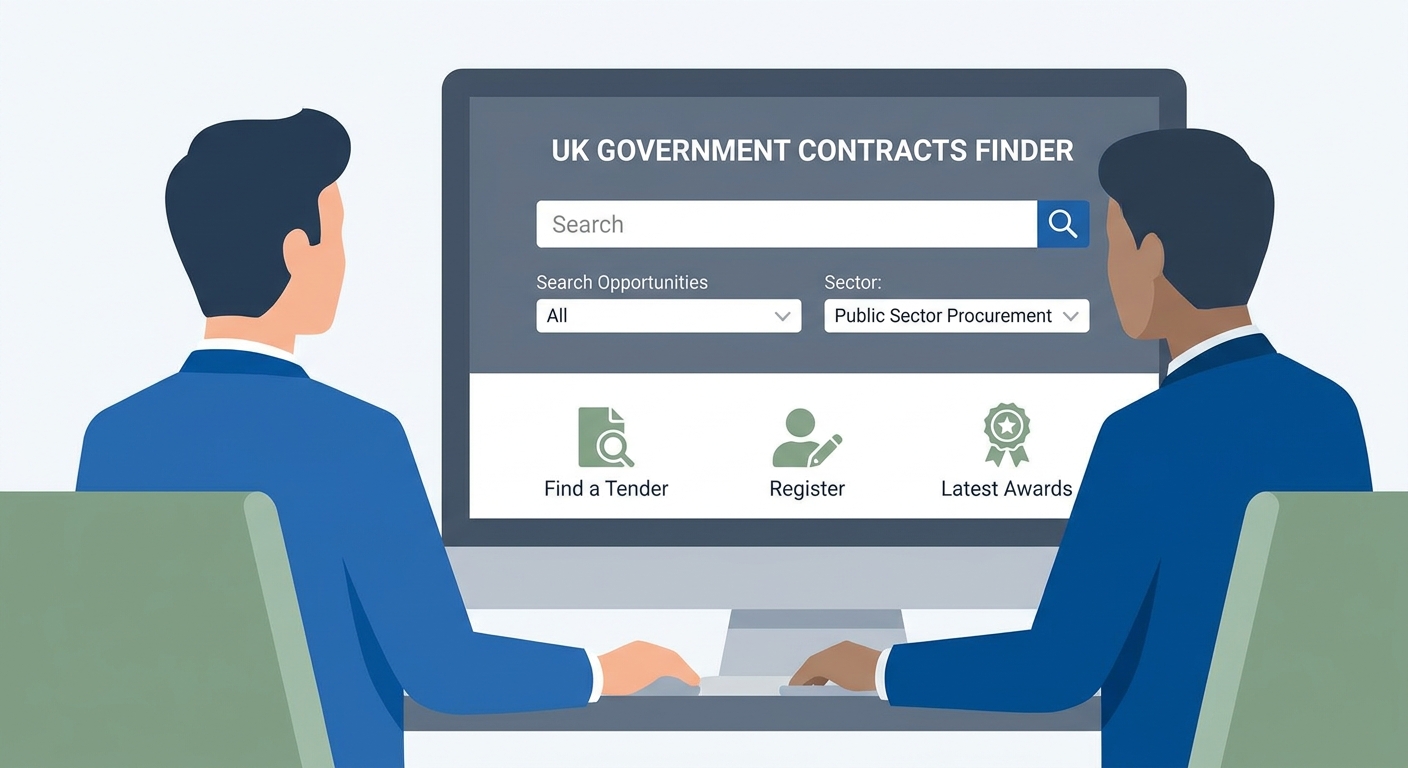
Business professional finding and responding to UK government contracts using mytender.io AI platform for tender portal management
---
The Portal Landscape at a Glance
| Portal | URL | Thresholds | Best For |
|---|---|---|---|
| Find a Tender Service | find-tender.service.gov.uk | Above statutory thresholds | All above-threshold UK public sector |
| Contracts Finder | contractsfinder.service.gov.uk | £10k+ (central gov) | Sub-threshold, SME-focused |
| Digital Marketplace | digitalmarketplace.service.gov.uk | No minimum | IT, cloud, digital services |
| Public Contracts Scotland | publiccontractsscotland.gov.uk | Lower than FTS | Scottish public sector |
| Sell2Wales | sell2wales.gov.wales | Lower than FTS | Welsh public sector |
| eSourcing NI | e-sourcingni.bravosolution.co.uk | NI-specific | Northern Ireland public sector |
| Delta eSourcing | delta-esourcing.com | Varies by buyer | Local government, NHS |
| Crown Commercial Service | crowncommercial.gov.uk | Framework-specific | Framework agreements |
Common Mistakes Suppliers Make With Tender Portals
Relying on a Single Portal
The most common and most costly mistake. Depending on which portals your target buyers use, a single-portal approach will miss a significant proportion of relevant opportunities. The fix is systematic coverage, not hours of manual searching — it's about setting alerts once on each relevant platform and managing a consolidated pipeline.
Registering Late
Virtually all eTendering platforms require pre-registration. Some require registration before you can even download tender documents. Attempting to register during an active procurement, with a deadline approaching, guarantees a poor experience and sometimes missed deadlines entirely if registration requires verification steps.
The rule: register on all relevant platforms before you need them, not when you do.
Ignoring Framework Opportunities
Many significant contracts are procured through frameworks (CCS, sector-specific, or buyer-specific) and never appear as individual opportunities on public portals. The individual call-off might not be advertised at all — the buyer directly approaches suppliers on the framework. If you're not on the relevant frameworks, you're invisible for that portion of the market.
Audit the frameworks relevant to your sector and build a plan to achieve placement on the most important ones.
Treating Alerts as a Task List
Alerts are intelligence, not a to-do list. Every alert should be assessed against your opportunity criteria before any resource is committed. The go/no-go decision — made quickly, with consistent criteria — is the discipline that separates organised bid teams from reactive ones.
Neglecting the Award and Pipeline Notice Layer
Most suppliers only look at live opportunities. The suppliers winning consistently are looking at the full picture: what's live now, what's been awarded and when does it expire, what's in the pipeline for the next 12 months, and who's winning what. That broader view shapes strategy, not just tactics.
---
How mytender.io Fits Into Your Portal Strategy
Finding the opportunity is only the first step. Once you've identified a relevant tender — whether from FTS, Contracts Finder, a framework, or a sector portal — the quality of your written response determines whether you win.
mytender.io is built specifically for the response phase. The platform's AI has been trained on thousands of successful UK public sector tender submissions, understanding the structure, language, and evidence requirements that evaluators are looking for. It doesn't replace your expertise and knowledge of your business — it amplifies it.
mytender.io AI platform helping procurement teams write winning tender responses from UK government portal opportunities
When a relevant opportunity hits your alert system, your team makes a go/no-go decision. If it's a go, the tender documents go into mytender.io. The platform:
- Analyses the specification and scoring criteria automatically
- Identifies the key themes and requirements the response needs to address
- Pulls relevant evidence from your content library (case studies, accreditations, team CVs, policies)
- Generates structured draft responses that meet word counts and formatting requirements
- Flags gaps where you need additional evidence or input from subject matter experts
The result isn't a response you submit without review — it's a structured draft that gives your team 80% of the work done, so they can focus on the 20% that requires genuine human judgement and creativity. For teams bidding regularly, the time saving is transformative. Suppliers have reported reducing their average bid time from 40 hours to under 15 hours per submission, without sacrificing quality.
More importantly, mytender.io learns your business over time. The more you use the platform, the better it gets at representing your specific capabilities, your case studies, and your competitive differentiators. The content library becomes an asset — a structured repository of everything you've ever written that can be repurposed, refined, and applied to the next opportunity.
---
Building Your Tender Portal Action Plan
If you've read this far, you're serious about improving your opportunity pipeline. Here's a concrete action plan to implement this week:
Day 1: Audit your current portal coverage List every portal you currently have an active account on. Cross-reference against the portals relevant to your target buyers. Identify the gaps. Day 2: Complete missing registrations Register on every portal you identified as a gap. This takes 20–30 minutes per portal — not a huge investment for a significant improvement in coverage. Day 3: Configure alerts on each portal For every portal, set up saved searches using your defined CPV codes, keywords, and filters. Configure daily digest alerts rather than immediate notifications. Day 4: Build your pipeline tracker Create a simple spreadsheet (or use your CRM) to track live opportunities: portal, title, buyer, publication date, deadline, estimated value, go/no-go, status. This becomes your weekly management tool. Day 5: Set up award notice monitoring Search Contracts Finder and FTS for recent award notices in your target sectors. For each relevant contract, record the expiry date and add it to your pipeline tracker as a future opportunity to watch. Week 2: Framework audit Identify the 3–5 most important framework agreements for your sector. Review their current status and any upcoming refresh windows. Prioritise getting onto frameworks where you're not currently listed. Month 1: Pre-market engagement Identify 2–3 buyers who have significant contracts expiring in 12–18 months in your pipeline tracker. Initiate pre-market engagement through their procurement teams.---
Summary: The Procurement Portal Landscape in 2026
The UK government spends over £300 billion annually on public procurement. A significant portion of that flows through the portals described in this guide — and the suppliers capturing their share of that spend are not necessarily the largest or the most experienced. They're the most organised.
Systematic portal coverage, well-configured alerts, a disciplined go/no-go process, and a structured approach to bid writing combine to produce win rates that are genuinely higher than the sector average. None of this requires a large bid team or significant technology investment. It requires clarity about your target market, consistency in monitoring, and quality in your responses.
The portals give you visibility. Your strategy gives you pipeline. mytender.io gives you the capacity to convert that pipeline into contracts.
If you're ready to see how AI-powered bid writing can transform your tender success rate, start your free trial of mytender.io today.
Tags
Ready to Transform Your Tender Writing?
See how MyTender's AI can help you write winning tenders in a fraction of the time.